
Hyundai VIN Decoder – 100% FREE VIN Decoder
Need to check the detailed information before purchasing a used Hyundai? Use our Hyundai VIN number decoder and check the detailed information like specifications, engine, and market value in less than a minute.
What is a Hyundai VIN Number?
A Hyundai VIN (Vehicle Identification Number) is a unique 17-character code assigned to each vehicle manufactured by Hyundai. It can be used to access specific information about any Hyundai, providing detailed information about its make, model, year of manufacture, engine type, transmission, and more.
The main benefit of the VIN is that it ensures the vehicle's authenticity and helps verify its specifications. It also helps in tracing a vehicle's history, including accident records, recalls, or theft status, allowing consumers to spot damaged, stolen, or salvaged vehicles.
How to Read a Hyundai VIN
A Hyundai VIN consists of 17 digits of code from a mixture of numbers and letters. These codes are not random; they represent different information about the vehicle. The VIN is classified into three categories: WMI, VDS, and VIS. Take a look at the section below to see how a VIN is deciphered.
Sample VIN: KM8K23AG3LU074313
WMI (World Manufacturer Identifier)
Characters 1–3: KM8
- K = Country of origin: South Korea
- M8 = Manufacturer: Hyundai Motor Company
VDS (Vehicle Descriptor Section)
Characters 4–9: K23AG3
- K2 = Model line: Hyundai Kona
- 3 = Body style: 4-door Crossover/SUV
- A = Engine type: 2.0L 4-cylinder engine
- G = Safety/restraint system designation
- 3 = Check digit used for VIN validation
VIS (Vehicle Identifier Section)
Characters 10–17: LU074313
- L = Model year: 2020
- U = Assembly plant: Ulsan, South Korea
- 074313 = Production Number
How to Decode the Hyundai VIN Number?
To decode the Hyundai VIN, you can use our service and get it done in less than a minute. Follow these instructions:
Step 1: Enter the VIN
Click on the form above to enter any Hyundai VIN you want to decode.
Step 2: Submit the Form
Click on the button to submit the form.
Step 3: Check the Hyundai Detailed Information
See the complete information on Hyundai, such as engine, specifications, transmission, body, and market value.
What Will You Get From Our Hyundai VIN Decoder?
With our Hyundai VIN code decoder, you can verify key vehicle details before making a purchase, selling a vehicle, or researching its factory specifications. Decoding a Hyundai VIN helps confirm that the vehicle matches its listing and provides a clearer picture of how it was originally built.
- Manufacturer and country of origin
- Model, trim level, and factory packages
- Engine specifications
- Transmission details
- Body style and vehicle type
- Model year
- Assembly plant information
- Original MSRP and factory equipment
Want More Info About Your Hyundai? Get A Vehicle History Report
Running a Hyundai VIN decoder does get you the complete information of the vehicle; however, it covers the basic information. If you need more information, you can get a Hyundai vehicle history report by VIN from our service. Here’s the information you’ll get on the vehicle history report.
Accident Records
Review reported accident records to better understand a vehicle's history. This section can help identify past damage and provide additional context before purchasing a used vehicle.
Accident Dates and Locations
See when reported accidents occurred and where they were recorded. This information can help establish a clearer timeline of the vehicle's history.
Reported Damage History
Depending on record availability, accident reports may provide details about the severity of the damage and the affected areas of the vehicle.
Stolen Vehicle Records
A stolen vehicle check helps determine whether a vehicle has ever been reported stolen. This information can reduce the risk of purchasing a vehicle with ownership or legal issues.
Theft Reports
Review records associated with reported theft events, including available reporting dates and jurisdictions.
Recovery Status
Check whether the vehicle was recovered after being reported stolen and review any related status updates.
Auction History
Auction records provide insight into a vehicle's past sales activity. Many vehicles appear at auction following lease returns, trade-ins, repossessions, or damage-related events.
Auction Sale Information
View auction dates, locations, and final selling prices when available.
Auction Photos
Access available auction images that may help reveal the vehicle's previous condition before resale.
Sales History
Sales history tracks when a vehicle was listed, sold, or relisted over time. Multiple listings can provide useful insight into the vehicle's market activity.
Listing Activity
Review previous listing dates and sales activity throughout the vehicle's history.
Price Changes Over Time
Track changes in asking prices and sales values across multiple listings.
Service and Maintenance Records
Service records help show how well a vehicle has been maintained throughout its life. Regular maintenance is often a positive sign of responsible ownership.
Routine Maintenance
Review records for common maintenance items such as oil changes, tire rotations, and inspections.
Repair History
See reported repairs and service work performed by repair facilities or dealerships.
Title Check
A title check helps verify the vehicle's legal status and identify title brands that could affect value or ownership.
Current Title Status
Determine whether the vehicle has a clean title or a branded title designation.
Title Brand History
Review title records associated with salvage, rebuilt, flood, junk, or lemon classifications.
Mileage History
Mileage records help verify the vehicle's reported usage over time and identify possible odometer discrepancies.
Recorded Mileage Readings
View mileage entries reported throughout the vehicle's ownership history.
Odometer Consistency
Compare mileage records over time to identify unusual gaps or inconsistencies.
Lien/Loan Check
A lien check helps identify whether a lender or financial institution may still have a legal claim against the vehicle.
Active Liens
Check for records indicating an outstanding lien attached to the vehicle.
Financial Interest Records
Review available information regarding loans or other financial obligations associated with the vehicle.
Ownership Records
Ownership history provides an overview of the vehicle's previous ownership timeline.
Number of Previous Owners
See how many owners have been associated with the vehicle over time.
Registration Timeline
Review ownership periods and registration history when available.
Recall Information
Recall records help identify manufacturer-issued safety recalls that may affect the vehicle.
Open Recalls
Check whether any unresolved recalls remain associated with the vehicle.
Recall Repair Information
Review recall descriptions, affected components, and available repair recommendations.
Where to Find a Hyundai VIN Number?
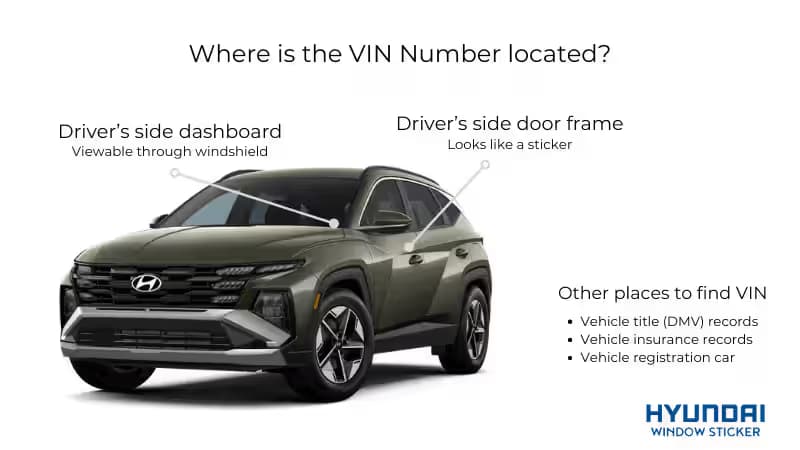
Finding the VIN on a Hyundai is a simple task because it's everywhere on the vehicle; you just need to know where to look. Hyundai places the VIN in several locations on the vehicle and documents to make it easier to spot.
Driver's Side Dashboard
Stand outside the vehicle and look through the lower corner of the windshield to view the VIN plate.
Driver's Side Door Jamb
Open the driver's door and inspect the door jamb or door frame. Most Hyundai vehicles have a manufacturer label that displays the VIN along with other vehicle information.
Engine Bay
Check the firewall, engine block, or nearby structural components for an engraved VIN.
Vehicle Documents
The VIN can also be found on official documents, including the vehicle registration, insurance card, title certificate, and other ownership records.
Common Uses of a Hyundai VIN Number
A Hyundai VIN (Vehicle Identification Number) is more than just an identifier. Government agencies, insurance companies, dealerships, vehicle history providers, and vehicle owners use the VIN to access important information about a vehicle throughout its lifetime.
Vehicle Registration
The VIN is used by a dealer or an individual to register a vehicle and verify its identity. It helps ensure that registration records match the correct Hyundai model and ownership information.
Insurance Purposes
Insurance companies use the VIN to identify a vehicle's specifications, trim level, engine type, and safety equipment. This information helps insurers determine coverage options and calculate premiums.
Window Stickers
A Hyundai VIN can be used to retrieve the original factory window sticker. Depending on record availability, the sticker may include the MSRP, factory-installed options, specifications, fuel economy ratings, and warranty information.
Vehicle History Checks
Vehicle history reports use the VIN to compile records related to accidents, title history, ownership changes, mileage records, recalls, and other vehicle-related events.
Police Checks
Law enforcement agencies use VINs to identify vehicles involved in investigations, verify ownership records, and determine whether a vehicle has been reported stolen.
Safety Recalls
Manufacturers and government agencies use the VIN to identify vehicles affected by safety recalls. A VIN check can help owners see whether recall repairs are available or still outstanding.
Top Hyundai Models You Can Lookup With a Hyundai VIN Decoder
Our Hyundai VIN decoder can break down the VIN of your favorite models to view specs, features, and history, including:
| Tucson | IONIQ 5 | Nexo | Tucson PHEV |
| Elantra | IONIQ 6 | Santa Cruz | Accent |
| Santa Fe | Palisade | IONIQ 5 N | Inster |
| Sonata | Venue | Elantra Hybrid | Sonata Hybrid |
| Kona | Veloster N | Kona Electric | Hyundai Excel |
← Scroll horizontally to see more →
FAQs on Hyundai VIN Decoder
Every Hyundai vehicle has a unique 17-digit VIN that contains information about its manufacturer, model, engine, trim level, and production details. You can usually find the VIN on the driver's side dashboard, driver's door jamb, vehicle registration, insurance card, or title documents. Once you have the VIN, use a Hyundai VIN decoder to view the vehicle's factory specifications.
Yes. A Hyundai VIN can be used to identify key vehicle details, including the model, trim level, engine configuration, transmission type, drivetrain, and other factory specifications. This information can help verify that a vehicle matches its advertised description.
Yes, several free Hyundai VIN decoder tools are available online. These tools can provide basic vehicle information, such as the model year, engine type, trim level, manufacturing plant, and other factory details associated with the VIN.
A Vehicle Identification Number (VIN) is a unique 17-character code assigned to every vehicle. Each section of a Hyundai VIN contains specific information about the vehicle, including where it was built, its specifications, and its production sequence.
Yes, but they serve different purposes. A Hyundai VIN decoder focuses on factory information such as the model, trim, engine, and other specifications. A vehicle history report goes further by providing records related to accidents, title brands, ownership history, recalls, and other reported events.
A VIN decoder uses the vehicle's 17-digit VIN to reveal factory specifications, including the make, model, model year, engine, trim level, and manufacturing information. A vehicle history report uses the same VIN to compile records related to the vehicle's ownership, title history, accidents, recalls, and maintenance events.
Checking a Hyundai for recalls starts with locating the vehicle's 17-digit VIN. The VIN can typically be found on the driver's side dashboard, driver's door jamb, vehicle registration documents, insurance paperwork, or title records. Once located, the VIN can be used to search for open or past recall campaigns associated with the vehicle with our service.