
Get a Hyundai Vehicle History Report by VIN
Thinking about getting a used Hyundai ? Don’t forget to check its records with our Hyundai vehicle history report by VIN. Check accident history, title brands, ownership records, mileage readings, recalls, and other key details that can help you make a more informed decision!
What is Hyundai Vehicle History?
A Hyundai vehicle history is the past records for a specific Hyundai, tied to its VIN (Vehicle Identification Number). It’s meant to show you the vehicle’s identity (like year, trim, engine, and factory setup) plus any important records that might affect safety, value, or legality, like title brands, mileage patterns, recall status, auction notes, and ownership timeline.
What Will You Get From the Hyundai Vehicle History Report
Our Hyundai vehicle history report shows detailed information about the vehicle, including specifications and past records like title, odometer reading, accident history, warranty records, recall, and much more.
Vehicle Specifications
Access factory information for both classic and modern Hyundai vehicles in a single report. Review details such as the model, trim level, engine, transmission, fuel type, MSRP, manufacturing information, and other specifications to help verify the vehicle's original configuration.
Title Records
A title check can reveal important information about a vehicle's legal status. Review title records to identify brands such as salvage, rebuilt, flood, junk, or lemon, and uncover potential issues that may affect value, ownership, or insurability.
Odometer Readings
Mileage can tell you a lot about a vehicle's history. View recorded odometer readings along with reporting dates to better understand vehicle usage and identify potential mileage inconsistencies.
Accident & Damage History
Review the reported accident and damage records linked to the vehicle. Depending on data availability, this section may include accident dates, reported locations, and damage-related events such as collisions, flood damage, or other incidents.
Auction History
Auction records can provide valuable insight into a vehicle's past. Check auction dates, locations, sale prices, vehicle condition details, and available photos to better understand how the vehicle was previously marketed or sold.
Ownership History
Learn more about the vehicle's ownership timeline through available registration and ownership records. This section may show ownership duration, registration locations, and other historical information without revealing personal owner details.
Recalls Check
Check for safety recalls that may have affected the Hyundai throughout its lifetime. Depending on the model year and available records, you may find recall descriptions, affected components, repair recommendations, and recall status information.
Engine Information
Verify the engine originally installed in the Hyundai, including its displacement, configuration, fuel type, and other factory specifications. This information can help confirm that the vehicle matches its advertised description and factory build.
How to Check Hyundai VIN
To check a Hyundai VIN, you can use our tool and get the vehicle history records in less than a minute. Follow these steps to get it done.
Step 1: Find the VIN
Check the driver’s side doorjamb, windshield, or documentation like registration or the bill of sale.
Step 2: Fill Out the Form
Once you have the VIN, click on the form and write the Hyundai VIN you want to check. After that, click on the button to submit the form.
Step 3: Get the Report
Check on the preview page to see specs and market value. Then, proceed to payment to secure the full vehicle history report.
Why Check a Hyundai's Vehicle History Before Buying
A used Hyundai may look great on the surface, but its history can reveal details that aren't immediately visible during a walkaround or test drive. Reviewing a vehicle history report before buying to see potential issues and verify important information.
Avoid Hidden Accident or Flood Damage
Not all damage is easy to spot. Previous collisions, flood exposure, or other major incidents can affect a vehicle's safety, reliability, and long-term value.
Confirm a Clean Title (No Salvage or Rebuilt Brands)
Check if the car has been issued a salvage, rebuilt, flood, or other branded title. These could impact the vehicle's value, financing options, and insurance coverage.
Verify Mileage Accuracy (Odometer Rollback Check)
Reviewing recorded odometer readings over time, buyers can look for unusual discrepancies that may indicate inaccurate or altered mileage records.
Negotiate Better
Access to verified vehicle records can strengthen your position during negotiations. You can use the pointers on the vehicle history report to negotiate better with the seller.
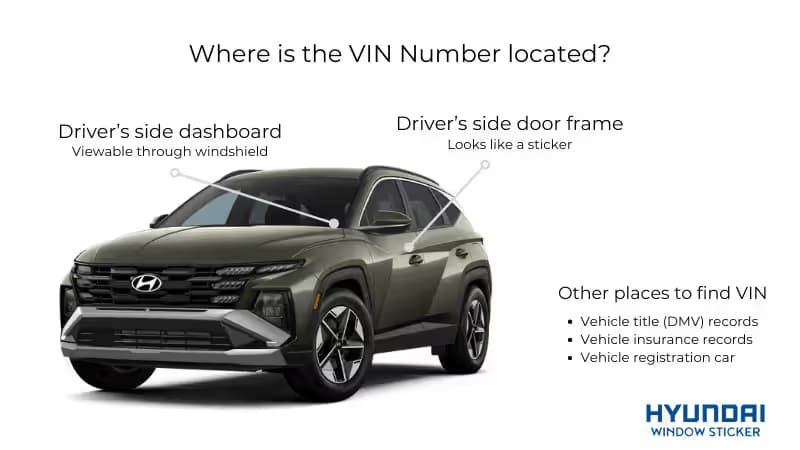
Where to Find Hyundai VIN
You can locate the VIN in multiple standard locations on your vehicle and paperwork. Check the following places:
- Lower Windshield Corner: Look through the front windshield at the dashboard's lower left corner on the driver's side.
- Driver's Side Door Jamb: Open the front driver's door and check the sticker mounted on the door jamb area.
- Vehicle Title Certificate: The VIN appears prominently on the official title document issued by your state motor vehicle agency.
- Registration Documentation: Your vehicle registration card displays the VIN to identify which vehicle it covers legally on the road.
- Insurance Papers: All insurance cards, policies, and declarations pages list the VIN for the covered vehicle.
- Maintenance Records: Service shops print the VIN on receipts, invoices, and work orders for accurate record keeping.
What Makes Us Better than Other Services?
Some services give you the basics and stop there. Our Hyundai report goes further, especially if you care about photos and real-world context. See the difference below:
| Feature | Carfax | Our Report | AutoCheck |
| Price | $44.99 | $19.99 | $29.99 |
| Single Report | Yes | Yes | Yes |
| Sales Listings with Photos | No | Yes | No |
| Auction Records with Photos | No | Yes | No |
| Market Value Data | Yes | Yes | Yes |
| Vehicle Specifications | Limited | Complete | Limited |
| Window Sticker Access | No | Yes | No |
| Classic VIN Decoding | No | Yes | No |
| Maintenance Guidance | Yes | Yes | No |
| Ownership History | Yes | Yes | Yes |
| Accident History | Yes | Yes | Yes |
| Damage Check | Yes | Yes | Yes |
| Branded Title Check | Yes | Yes | Yes |
| Salvage Title Check | Yes | Yes | Yes |
| Ownership History Map | No | Yes | No |
| Recall Information | Yes | Yes | Yes |
| Support for Heavy-Duty Trucks, ATVs, Trailers, Motorcycles | No | Yes | No |
| Mobile/Desktop App | No | Yes | No |
← Scroll horizontally to see more →
Get a Window Sticker for Any Hyundai Model
Our window sticker lookup tool decodes the VINs of all Hyundai cars, sedans, SUVs, trucks, EVs, hybrids, buses, and more. Get a window sticker for all models, including:
| i10 | i20 | i30 | Tucson |
| Santa Fe | Creta | Kona | Palisade |
| Elantra | Sonata | Venue | Ioniq 5 |
| Genesis | Veloster | Azera | Accent |
← Scroll horizontally to see more →
Get Your Hyundai Report Now!
Don’t let a “good deal” rush you. Run the Hyundai check, and read the history calmly. If it’s clean, great. If it’s messy, you’ll be glad you looked first.
FAQs on Hyundai Vehicle History Report
To check your Hyundai VIN Number online, you just find the car’s 17-digit VIN and then use a trusted online VIN Decoder site like the Hyundai Window Sticker’s VIN Decoder service. You’ll get the detailed specifications and market value at no cost.
Yes, there are a few ways to learn more about Hyundai's history and previous locations. Hyundai owners may be able to access certain vehicle information through Hyundai-connected services, while a vehicle history report can provide registration and ownership records that help show where the vehicle was previously titled or registered.
Hyundai has issued numerous recalls across different models and model years. Because recalls are tied to specific vehicles, the most reliable way to check for recall information is by searching using the vehicle's VIN.
To run a Hyundai VIN check, you'll need the vehicle's 17-digit VIN. This unique identifier can be used to access information about the vehicle's specifications, manufacturing details, recalls, title records, and other available history data.
Hyundai owners may be able to access certain service and maintenance information through Hyundai owner resources and connected vehicle platforms. For a broader view of the vehicle's history, including accident records, title information, ownership history, recalls, and other reported events, a vehicle history report can provide additional insight.
A vehicle history report focuses on records generated throughout the vehicle's life, such as accidents, title changes, ownership history, and maintenance events. A window sticker, on the other hand, shows how the vehicle was originally configured when new, including the MSRP, factory-installed options, specifications, and standard equipment.
Yes, a Hyundai's VIN can be used to check for reported accident history. Because many accident-related records are linked to the vehicle's VIN, a vehicle history report may reveal reported collisions, damage events, insurance claims, and other related records when available.
Yes. Vehicle history reports can help identify whether a Hyundai has been issued a salvage, rebuilt, flood, junk, or other branded title. This information is typically listed within the title history section of the report and can help buyers better understand the vehicle's past.
Vehicle history reports are a valuable tool for researching a Hyundai's background, including title records, reported accidents, ownership history, and mileage records. However, the report is only as complete as the data available from reporting sources, which means some events may not appear if they were never reported or recorded.